Community Builder Guide
About Being a Community Builder
Community Builders (CBs) are more than just ambassadors. The Couchers.org platform is centered around local communities, and CBs are the local coordinators of these communities. CBs are volunteers responsible for growing and nurturing the community through local engagement. This includes organizing or supporting events, spreading the word about Couchers.org, engaging in discussions, and welcoming those new to couch surfing. Most importantly, CBs uphold our culture of safety and trust by educating users and moderating content.
By engaging with the local community and people curious about couch surfing, CBs collect community feedback and pass it on to the development team of the Couchers.org platform. This bridge between the local community and the developers ensures that Couchers.org remains a platform truly built by and for the global couch surfing community.
Our Growth Philosophy: Quality Over Quantity
We do not want community growth at all costs. We want a safe, trustworthy community that shares our values. This requires active work from CBs. By stepping in to explain our rules and values to people and also reporting problematic behavior or content, CBs help the community grow naturally with users who support our core values.
Not everyone is a good fit for non-transactional hospitality exchange. People who intend to use Couchers.org to abuse the system, take advantage of people, use the platform for dating or sex, or seek free lodging without engaging in cultural exchange do not belong here. Do not spend your time or energy trying to recruit or convert them. It is more productive to focus your outreach on welcoming people who already share our core values, or are at least genuinely open to embracing them. Building a high-trust foundation now is what allows our community to scale safely for years to come.
PART 1: First Steps & Foundation (Onboarding)
1. Trust, Safety, and Moderation
First and foremost, please take some time to read the Community Rules and Guidelines. It is important you are familiar with the community rules and guidelines since community members may look to you for help. The Safety & Trust Team also relies on you to help monitor the platform and report any activity, content, or behavior that violates our rules or Terms of Service.
- Always Report First: Every violation should be reported so the Safety & Trust Team is aware, even if the violation may seem minor. Use the green flag symbol (available on profiles, events, discussions, comments, chats, photos, etc.) to submit a report directly to the Safety & Trust Team. You can also email safety@couchers.org with additional details.
- Educating vs. Escalating: If you encounter a minor problem in person and you feel comfortable doing so, you can let the person know about our rules and guidelines. When doing so, keep the conversation calm and objective, and avoid getting drawn into personal arguments. However, it is still a good idea to submit a report after. If the issue is severe or if there is any safety risk, do not engage with the offender at all! Just submit a report as soon as possible.
- Providing Additional Context: If a situation requires additional details, photos, videos, or context that cannot be submitted with your report on-platform, email safety@couchers.org with the username(s) and full details.
- Support Affected Members: If a member tells you about a rule violation or safety issue, offer empathetic support, refer them to available resources, and encourage them to submit a report. If they seem like they may not report it themselves, or the situation potentially involves a safety risk, you must send a report to safety@couchers.org so our team can investigate and protect the community. Don't be afraid of duplicate reports being sent. The Safety & Trust Team would rather have duplicate reports than risk no report at all!
- Future Features: In the future, CBs will have the opportunity to apply to become Community Moderators, enabling trusted local leaders to moderate content directly. This is part of our plan to implement a distributed moderation model, where responsibilities are spread out instead of centralized. It will take time to build these features. While becoming a moderator will always be optional, we look forward to collaborating with interested CBs.
2. Setting Up & Managing Your Community Page
When you first take on a community (or join an existing local CB team), start with these steps and maintain them on a regular basis:
- Upload a Community Photo: Ensure your community banner photo represents your city/region well, does not contain promotional information, text, or watermarks, and is licensed to be used freely. Any photo size can be used, but a photo with a 9:2 ratio (or exactly 1168x256 pixels) is ideal, so it works on both mobile and desktop.
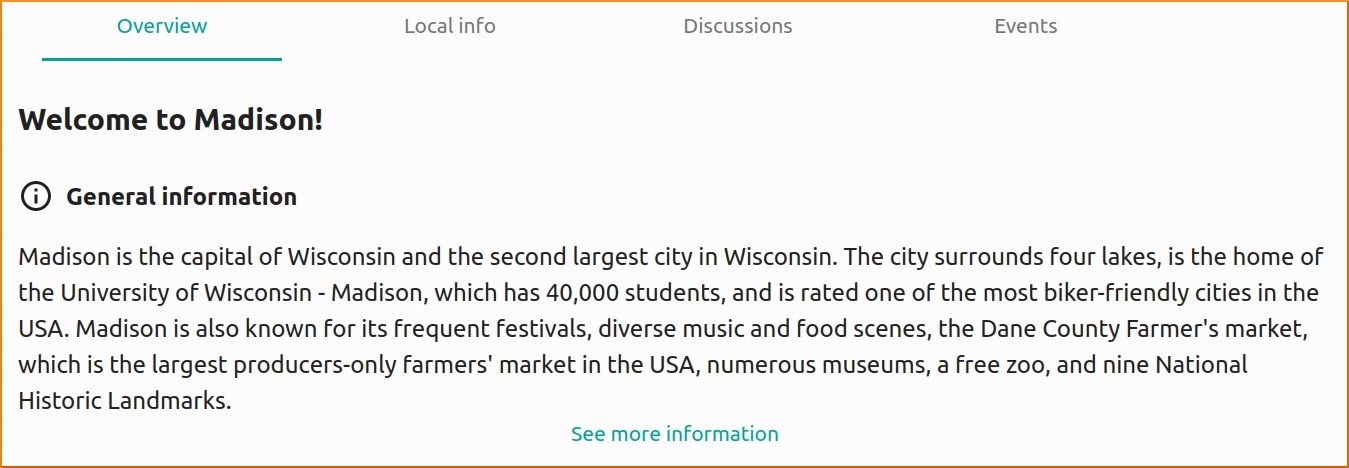
- Update the Short Description: Check the "General information" section on your community's "Overview" tab. If it needs to be updated, write a concise overview under 500 characters (50–80 words). Email the text to community.building@couchers.org with your community name in the subject line. (Note: Currently this text needs to be manually updated by admins, so there may be a delay in processing any update requests).
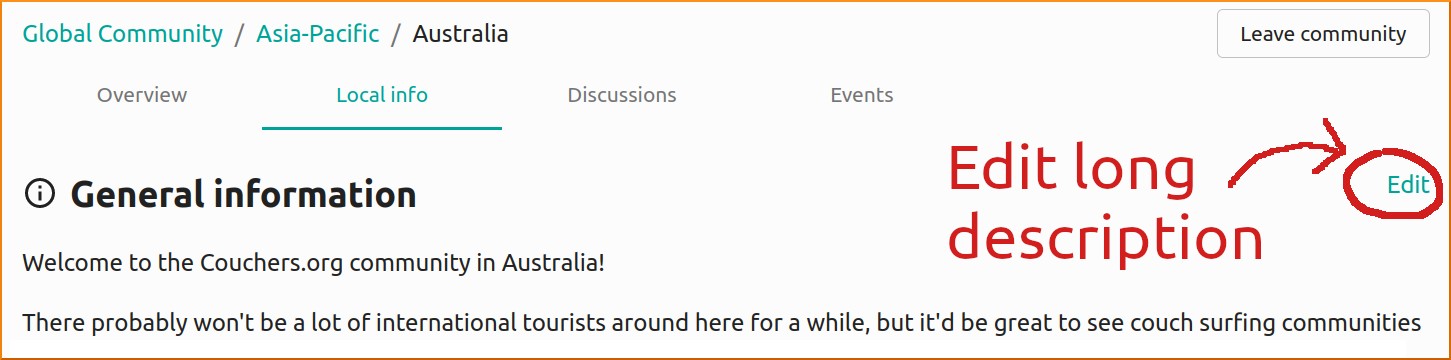
- Update the Long Description ("Local Info" Page): You can edit this text directly on the page! Click on the "Local Info" tab and then click on "Edit". Make this section a collaborative resource by asking locals for suggestions and incorporating them. Include practical tips like public transit options to/from and within the community, neighborhood tips, regular meetup customs, and emergency numbers (police, fire, ambulance).
- Write an Introductory Post: Go to the "Discussions" tab of your community and start a discussion thread introducing yourself. Let members know you are their local Community Builder and a go-to person for questions about the community or collaborating within the community — like events. Be sure to reply when members comment! Feel free to adapt this template:
"Hey everyone! I'm [Name], and I'm excited to be a Community Builder here in [City/Region]. I've been couch surfing for [X] years and love helping travelers and locals. I'm here to help grow our local community, organize events, and help you get the most out of Couchers.org. Feel free to reach out if you have any questions or ideas for local meetups! Drop a comment below to introduce yourself, and feel free to share what your favorite local spot in [City/Region] is!"
PART 2: Day-to-Day Community Maintenance
3. Supporting Members & Sparking Engagement
A warm welcome can turn a newly joined, passive community member into an active community member.
- Welcome New Members: Check the "Members" tab of your community, or the map to spot new members. Send a friendly direct message welcoming them, inviting them to upcoming events, and pointing them to the Help Center if they are new to the platform. (Note: Couchers.org will be adding features to help make finding and welcoming new users easier in the future!)
- Answer Questions: When answering a member's question (via DM or on the community page), always include a link to the relevant Help Center article for future reference. Never guess on policy or technical issues! Direct any technical assistance or policy inquiries to support@couchers.org. Use the on-platform bug reporting tool to report software bugs. Message or email your Community Builder Program Managers (CBPMs) at community.building@couchers.org for general community builder matters.
- Keep the Community Alive: Keep your community page alive by hosting events regularly or by starting or responding to discussions.
- Share Platform Feedback: As you gather valuable information on feature requests and community sentiment, share these regularly with your CBPMs. However, bugs should be reported using the bug reporting tool in the upper-right menu. Remember, when discussing platform topics publicly within your local community, keep privacy in mind and never discuss specific moderation incidents or individual users.
4. Organizing & Promoting Local Events
Events are the heartbeat of local couch surfing communities. Host them yourself, encourage local members to host, or help people promote or collaborate on events!
Practical Tips for Successful Event Planning
- Pick an Accessible Day & Time: Mid-week evenings (Wednesday/Thursday) or weekend afternoons often work best. Avoid standard weekday working hours unless aimed at shift workers/travelers in transit. Many people have plans on Friday and Saturday evenings, so give plenty of advance notice for those. Hosting a recurring event on a predictable schedule (e.g. "First Wednesday of every month" or "Every other Thursday") builds long-term habits and momentum, even if the first few meetups are small! If you continue to have low attendance, try a different day of the week or a different venue.
- Choose the Right Location & Venue: Try to find a relatively central or easily accessible location and pick a venue with flexibility. Generally, it is better to have too much space than too little. Ensure the noise level is not too loud and allows attendees to talk without needing to yell. Favor free public spaces or casual venues with no mandatory minimum spend. Be mindful of age restrictions (e.g. 21+ venues prevent younger members from joining), smoking areas (since most people don't like smoke), and pets (in case people have allergies).
- Have a Backup Plan: If the event is outdoors, pick a nearby indoor backup spot in case of bad weather, and clearly communicate the backup plan on the event page. Keep an eye on the weather forecast.
- Include Location and Accessibility Info: Clearly describe how to find the exact meeting spot. Post information on how to get there, including the closest public transit stop (and directions from there). Bike/car parking availability and accessibility for attendees with disabilities should also be mentioned.
- Bring a Couchers.org Sign: Print the Couchers.org logo to use as a sign or marker so people can easily find your group. You can find the official Couchers logo, wordmark, fonts, and colors here. Please do not modify the official logo, and check with your CBPM before printing any custom local merchandise or promotional materials.
- Promote the Event:
- Encourage the organizer to click the "Invite the community" button on the event page to send an email invitation to all members of the local community.
- Send personalized invitations to new or active locals via direct message (be sure to include a link to the event!).
- Cross-post in other couch surfing or travel groups (respecting their rules and keeping your audience in mind).
- Always ask attendees for permission before taking group photos at events, especially before posting them to external social media or chat groups.
- Planning a Couch Crash, invasion, or other large-scale national/international event? Email community.building@couchers.org to request your event be added to the official Couch Crash Calendar and discuss other promotion ideas!
5. Outreach & Growing the Volunteer Team
Outside of Couchers.org, you play a key role in local outreach and bringing your couch surfing community and other travel enthusiasts onto the platform.
- Event Outreach: Attend local couch surfing events (Couchsurfing™, BeWelcome, Trustroots, Meetup, Nomadtable) or international travel meetups and naturally share Couchers.org, not as an official promoter but as a highly active member and volunteer.
- Spread the Word with Merch: Wearing or using items from our Merch Shop is a natural conversation starter at events and in everyday life. Every purchase includes a donation that directly funds our all-volunteer-run non-profit. Feel free to pick something up for yourself, or let local members know the store exists if they are looking for a way to financially support the platform while helping increase our visibility!
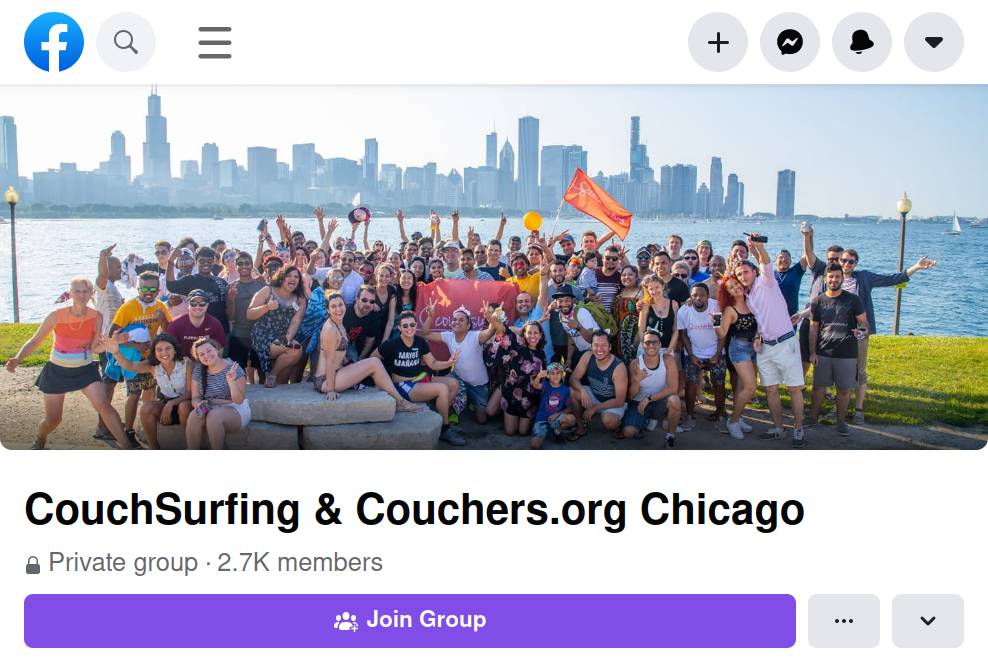
- Digital Outreach: Spread the word on local social media or chat groups related to couch surfing or international travel. Where welcomed by admins, encourage existing local couch surfing groups (Facebook, WhatsApp, Telegram) to include Couchers.org in their group title and description. See the Chicago community Facebook group as an example below. Always keep in mind your audience and whether the people in the group are compatible with Couchers.org values and rules.
- Recruit Fellow CBs (Co-Leaders): If you encounter any other exceptional, welcoming, and well-connected couch surfers in your community who might make a good CB, you could ask them to co-lead alongside you. Try to build a team that reflects the diversity of your local community. Direct interested members to the Community Builder role description on the volunteering page.
- Recruit Other Volunteers: Couchers.org is a 501(c)(3) non-profit built entirely by volunteers. If you meet software engineers, UI/UX designers, marketing professionals, or translators, encourage them to apply to volunteer via the Volunteer Page!
PART 3: Support & Resources
6. Resources & Contacting the Team
You are never alone in this role! Your primary points of contact are your Community Builder Program Managers (CBPMs). If you have questions, ideas, or need support with an event, reach out to your CBPMs or email us at community.building@couchers.org. You can also contact the Safety & Trust Team or Support Team directly via email. If life gets busy or you plan to travel long-term, simply let us know at community.building@couchers.org so we can pause your role or help transition your duties.
Important Contacts:
- community.building@couchers.org is the email for general community builder matters, event promotion, and community page updates.
- safety@couchers.org is for contacting the Safety & Trust Team directly, especially to provide context, photos, or videos related to behavior or content violations.
- The Bug Reporting Tool (On-Platform) should always be used to report software bugs directly to the development team. Click on the menu in the upper-right, select "Report a problem" and then "Report a technical problem". If you want to submit a screenshot or screen recording video of the problem, you can send it to support after reporting via the bug reporting tool.
- support@couchers.org can be used for technical assistance, account inquiries, or policy questions.
Helpful Links:
- Help Center — This page explains our policies, values, and how to use the platform.
- Logo & Brand Assets — Download the official Couchers.org logo, wordmark, fonts, and colors.
- Donate to Couchers.org — Financially support this non-profit project to keep it alive.
- Merch Shop — Official Couchers.org merchandise (clothing, stickers, flags, buttons, and more).
- Crash Calendar — Lists large regional and international couch surfing events like Couch Crashes, Invasions, and Camps.
- Couchers.org Blog — Find all our blog posts here.
- Platform Roadmap — Find out what we're building and what's next here.
- About Couchers, Inc. — Learn about our legal structure, governance, and non-profit status.
- FAQs about the Project — Answers to common questions about Couchers.org.
- GitHub Repository — Our open-source code lives here.
Thank you for being such an active part of Couchers.org. We are excited to build this community alongside you!